

Latest Version
Version
5.5
5.5
Update
January 31, 2026
January 31, 2026
Developer
Zoltán Pallagi
Zoltán Pallagi
Categories
Tools
Tools
Platforms
Android
Android
Downloads
0
0
License
Free
Free
Package Name
com.pzolee.wifiinfo
com.pzolee.wifiinfo
Report
Report a Problem
Report a Problem
More About WiFi Analyzer
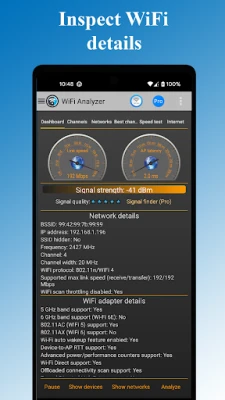
Find out why your WiFi is slow. See channel congestion, detect interference, optimize your router placement.
Unlike basic analyzers that only show signal strength, WiFi Analyzer reveals the real problems: channel congestion from neighbors, interference sources, and actual throughput to your router - not just internet speed. Whether you're optimizing your home network or troubleshooting professionally, see what's really happening with your WiFi
Key features
Next-Generation WiFi Support:
- WiFi 7 compatibility with 320MHz channel width support
- WiFi 6E & 6GHz band analysis - Future-ready technology
- 2.4GHz, 5GHz, and 6GHz comprehensive scanning
- WiFi 6
Professional Network Analysis Tools:
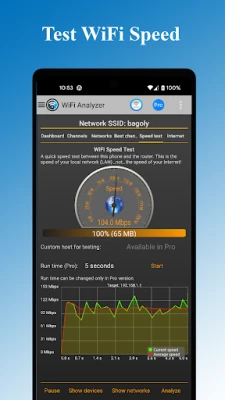
- Real-time throughput meter to your router (unique feature)
- Multi-target ping testing to popular internet addresses
- Latency analysis for gaming and streaming optimization
- DNS verification and network troubleshooting
Network Security & Management:
- Detect unauthorized users on your WiFi network
- Security analysis: WEP, WPA, WPA2, WPA3 support
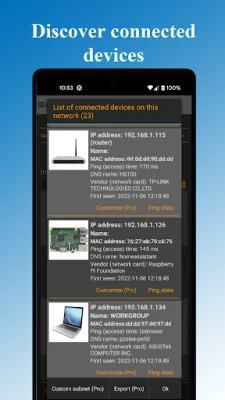
- Connected device scanner with device type detection
- Network vulnerability assessment
Advanced Visualization & Analytics:
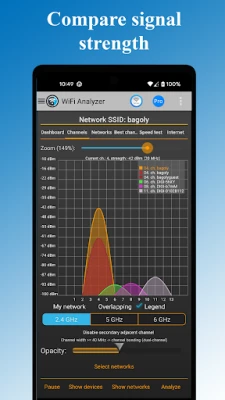
- Signal strength heatmaps and channel congestion charts
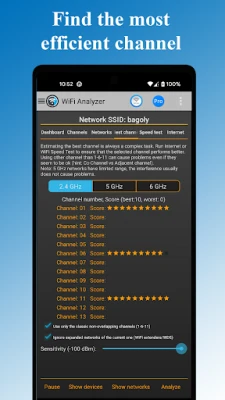
- Optimal channel recommendations based on interference analysis
- Historical data tracking and network performance trends
- Export capabilities for professional reporting
Smart Optimization Features
- Automatic router placement suggestions for maximum coverage
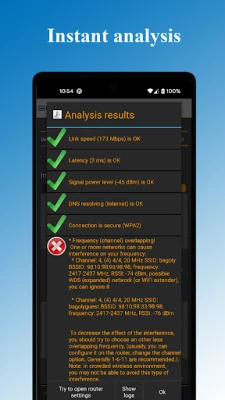
- Channel overlap detection and interference mitigation
- WiFi band recommendations (2.4GHz vs 5GHz vs 6GHz)
- Router configuration access for quick settings changes
Perfect For:
Home Users: Optimize your WiFi for streaming, gaming, and remote work
IT Professionals: Comprehensive network analysis and troubleshooting
Network Administrators: Enterprise-level WiFi planning and management
Tech Enthusiasts: Advanced features and detailed network insights
Advanced Capabilities:
- DHCP information analysis and IP configuration details
- Frequency and channel width detection (20/40/80/160/320 MHz)
- Access point discovery with distance estimation
- Raw data access for technical analysis beyond charts
Themes & Customization
- Dark and Light themes for comfortable viewing
- Customizable filters: SSID, WiFi band, signal strength, security type
- Flexible display options: Complete or compact access point view
- Export functionality for data analysis and reporting
Key features
Next-Generation WiFi Support:
- WiFi 7 compatibility with 320MHz channel width support
- WiFi 6E & 6GHz band analysis - Future-ready technology
- 2.4GHz, 5GHz, and 6GHz comprehensive scanning
- WiFi 6
Professional Network Analysis Tools:
- Real-time throughput meter to your router (unique feature)
- Multi-target ping testing to popular internet addresses
- Latency analysis for gaming and streaming optimization
- DNS verification and network troubleshooting
Network Security & Management:
- Detect unauthorized users on your WiFi network
- Security analysis: WEP, WPA, WPA2, WPA3 support
- Connected device scanner with device type detection
- Network vulnerability assessment
Advanced Visualization & Analytics:
- Signal strength heatmaps and channel congestion charts
- Optimal channel recommendations based on interference analysis
- Historical data tracking and network performance trends
- Export capabilities for professional reporting
Smart Optimization Features
- Automatic router placement suggestions for maximum coverage
- Channel overlap detection and interference mitigation
- WiFi band recommendations (2.4GHz vs 5GHz vs 6GHz)
- Router configuration access for quick settings changes
Perfect For:
Home Users: Optimize your WiFi for streaming, gaming, and remote work
IT Professionals: Comprehensive network analysis and troubleshooting
Network Administrators: Enterprise-level WiFi planning and management
Tech Enthusiasts: Advanced features and detailed network insights
Advanced Capabilities:
- DHCP information analysis and IP configuration details
- Frequency and channel width detection (20/40/80/160/320 MHz)
- Access point discovery with distance estimation
- Raw data access for technical analysis beyond charts
Themes & Customization
- Dark and Light themes for comfortable viewing
- Customizable filters: SSID, WiFi band, signal strength, security type
- Flexible display options: Complete or compact access point view
- Export functionality for data analysis and reporting
Rate the App
Add Comment & Review
User Reviews
Based on 0 reviews
No reviews added yet.
Comments will not be approved to be posted if they are SPAM, abusive, off-topic, use profanity, contain a personal attack, or promote hate of any kind.















More »

Popular Apps

KeyNavigatorKeyBank, N.A.

Quest Town SagaKairosoft

Knight Eternal: Pixel RPGJoshua Keith

KAIJU NO. 8 THE GAMEAkatsuki Games Inc.

Bank of America Private BankBank of America

Nitro Nation: Car Racing GameSupercharge Mobile

Grow Swordmasterpixelstar

MoboReels: Good Reel Short TVMOBOREADER TECHNOLOGY USA CO LTD

Wells Fargo Vantage℠Wells Fargo Mobile

IBKR MobileInteractive Brokers Group
More »
Editor's Choice

Grim Soul: Dark Survival RPGBrickworks Games Ltd

Craft of Survival - Gladiators101XP LIMITED

Last Shelter: SurvivalLong Tech Network Limited

Dawn of Zombies: Survival GameRoyal Ark

Merge Survival : WastelandStickyHands Inc.

AoD Vikings: Valhalla GameRoboBot Studio

Viking Clan: RagnarokKano Games

Vikings: War of ClansPlarium LLC

Asphalt 9: LegendsGameloft SE

Modern Tanks: War Tank GamesXDEVS LTD