

Latest Version
Update
April 05, 2026
April 05, 2026
Developer
Gio Apps 2024
Gio Apps 2024
Categories
Tools
Tools
Platforms
Android
Android
Downloads
0
0
License
Free
Free
Package Name
com.nowinnov.swipegallery
com.nowinnov.swipegallery
Report
Report a Problem
Report a Problem
More About Swipe Photo cleaner
Your storage is full. Swipe to fix it.
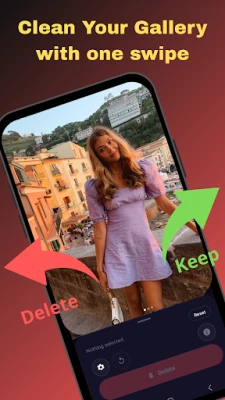
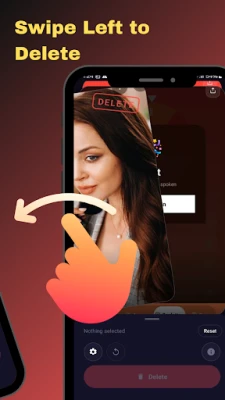
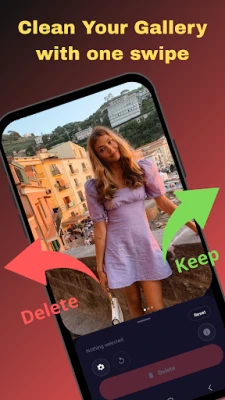
Swipe Photo Cleaner is the fastest way to wipe your gallery clean. Just swipe left to delete, swipe right to keep — and watch your free space grow in minutes.
The Swipe & Wipe Method — Simple by Design
Most gallery cleaners are slow, cluttered, and frustrating. Swipe Photo Cleaner works differently. Every photo and video gets a single swipe decision — keep it or wipe it. No bulk selecting, no endless scrolling, no second-guessing.
It's the ultimate swipe-to-delete experience: fluid, fast, and built for people who actually want to clean their phone storage — not spend an hour figuring out how.
Whether you want to wipe duplicate photos, swipe away old videos, or just wipe out the clutter that's been slowing your phone down, this app gets it done.
Everything You Need to Swipe & Wipe
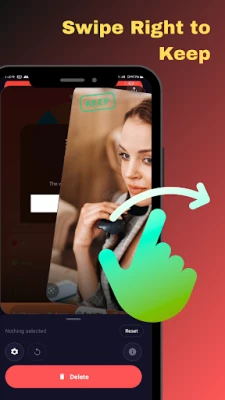
• Swipe left to delete, swipe right to keep — instant, one-handed control
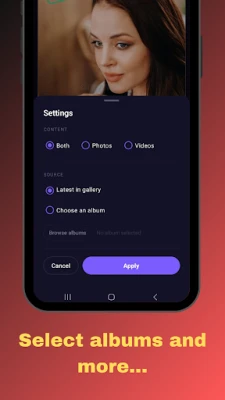
• Swipe through photos and videos — full gallery or media type of your choice
• Wipe photos only — filter to photos exclusively for a focused clean
• Wipe videos only — target large video files eating your storage
• Swipe by album — select specific albums to wipe, not your entire gallery
• Fast swipe engine — no lag, no delay, just smooth swiping
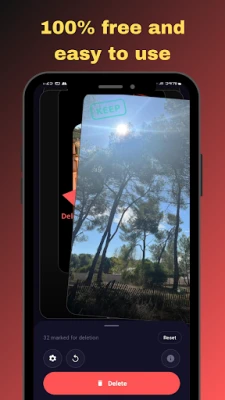
• Clean wipe, zero risk — review before anything is permanently deleted
• Minimal interface — nothing between you and a clean gallery
• Multi-language support — swipe and wipe in your language
• 100% free — swipe all you want, no subscription, no paywall
When You Need to Swipe & Wipe
• Your phone says "storage full" every other day
• You take dozens of photos per outing and never clean them up
• You have hundreds of videos eating gigabytes of space
• You've tried gallery cleaners before but found them too slow or complicated
• You want to wipe your gallery fast — without accidentally deleting the wrong thing
Swipe Photo Cleaner was built for exactly these moments. A quick swipe session — even just five minutes — can wipe gigabytes of clutter off your phone.
How It Works
1. Open the app and choose what to clean — photos, videos, or both
2. Select an album or swipe through your full gallery
3. Swipe left to delete, swipe right to keep
4. Confirm your wipe and free up your storage instantly
That's the entire experience. No learning curve. No settings maze. Just swipe, wipe, and done.
Download Swipe Photo Cleaner — start swiping, start wiping, free up space today.
The Swipe & Wipe Method — Simple by Design
Most gallery cleaners are slow, cluttered, and frustrating. Swipe Photo Cleaner works differently. Every photo and video gets a single swipe decision — keep it or wipe it. No bulk selecting, no endless scrolling, no second-guessing.
It's the ultimate swipe-to-delete experience: fluid, fast, and built for people who actually want to clean their phone storage — not spend an hour figuring out how.
Whether you want to wipe duplicate photos, swipe away old videos, or just wipe out the clutter that's been slowing your phone down, this app gets it done.
Everything You Need to Swipe & Wipe
• Swipe left to delete, swipe right to keep — instant, one-handed control
• Swipe through photos and videos — full gallery or media type of your choice
• Wipe photos only — filter to photos exclusively for a focused clean
• Wipe videos only — target large video files eating your storage
• Swipe by album — select specific albums to wipe, not your entire gallery
• Fast swipe engine — no lag, no delay, just smooth swiping
• Clean wipe, zero risk — review before anything is permanently deleted
• Minimal interface — nothing between you and a clean gallery
• Multi-language support — swipe and wipe in your language
• 100% free — swipe all you want, no subscription, no paywall
When You Need to Swipe & Wipe
• Your phone says "storage full" every other day
• You take dozens of photos per outing and never clean them up
• You have hundreds of videos eating gigabytes of space
• You've tried gallery cleaners before but found them too slow or complicated
• You want to wipe your gallery fast — without accidentally deleting the wrong thing
Swipe Photo Cleaner was built for exactly these moments. A quick swipe session — even just five minutes — can wipe gigabytes of clutter off your phone.
How It Works
1. Open the app and choose what to clean — photos, videos, or both
2. Select an album or swipe through your full gallery
3. Swipe left to delete, swipe right to keep
4. Confirm your wipe and free up your storage instantly
That's the entire experience. No learning curve. No settings maze. Just swipe, wipe, and done.
Download Swipe Photo Cleaner — start swiping, start wiping, free up space today.
Rate the App
Add Comment & Review
User Reviews
Based on 0 reviews
No reviews added yet.
Comments will not be approved to be posted if they are SPAM, abusive, off-topic, use profanity, contain a personal attack, or promote hate of any kind.














More »

Popular Apps

KeyNavigatorKeyBank, N.A.

Quest Town SagaKairosoft

Knight Eternal: Pixel RPGJoshua Keith

KAIJU NO. 8 THE GAMEAkatsuki Games Inc.

Bank of America Private BankBank of America

Nitro Nation: Car Racing GameSupercharge Mobile

Grow Swordmasterpixelstar

MoboReels: Good Reel Short TVMOBOREADER TECHNOLOGY USA CO LTD

Wells Fargo Vantage℠Wells Fargo Mobile

IBKR MobileInteractive Brokers Group
More »
Editor's Choice

Grim Soul: Dark Survival RPGBrickworks Games Ltd

Craft of Survival - Gladiators101XP LIMITED

Last Shelter: SurvivalLong Tech Network Limited

Dawn of Zombies: Survival GameRoyal Ark

Merge Survival : WastelandStickyHands Inc.

AoD Vikings: Valhalla GameRoboBot Studio

Viking Clan: RagnarokKano Games

Vikings: War of ClansPlarium LLC

Asphalt 9: LegendsGameloft SE

Modern Tanks: War Tank GamesXDEVS LTD