

Latest Version
Update
May 14, 2026
May 14, 2026
Developer
Parti Albert - App system Code
Parti Albert - App system Code
Categories
Tools
Tools
Platforms
Android
Android
Downloads
0
0
License
Free
Free
Package Name
com.appsyscode.sshnasrpi
com.appsyscode.sshnasrpi
Report
Report a Problem
Report a Problem
More About RPI SSH Pro - for Linux/Debian
RPI SSH PRO – fast SSH-based server management
RPI SSH PRO is a modern, fast, and intuitive SSH client that lets you manage your servers easily from your mobile device.
It supports Raspberry Pi, Linux, Debian, Synology (Linux-based) systems, and Windows servers with OpenSSH, providing quick access to system status, maintenance tasks, and command execution.
⸻
System Overview (Dashboard)
View the most important system information at a glance:
• Uptime
• CPU usage
• Temperature
• Disks and total storage
• Mounted file systems
• Number of connected drives
Designed for fast diagnostics and everyday server monitoring.
⸻
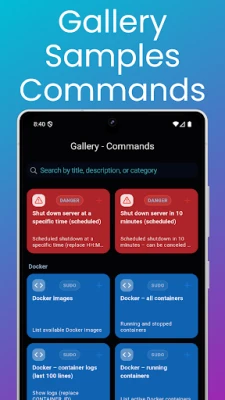
Command Gallery (Samples)
A wide range of prebuilt command templates:
• can be quickly added to your own Command Cards
• perfect for maintenance, diagnostics, and administration tasks
• works across Linux-based systems and Windows PowerShell environments
⸻
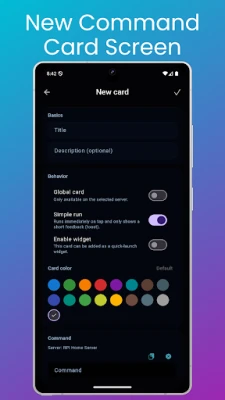
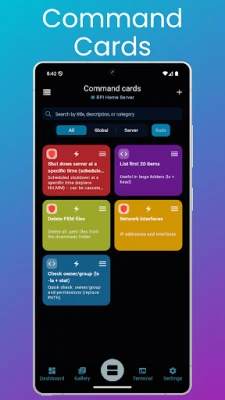
Command Cards
Manage your custom commands using cards:
• add, edit, and search command cards
• drag & drop reordering
• Quick Run mode for one-tap execution
• global cards or server-specific cards
• reusable commands across multiple servers and platforms
⸻
Widget Quick Launch
Your most important command cards can be added as widgets:
• run commands without opening the app
• ideal for frequently used maintenance and monitoring tasks
• instant access to your most important server actions
⸻
Multi-server support
• add and edit multiple servers
• switch between servers quickly
• secure connections using SSH host key verification
• manage mixed environments (Linux + Windows) from one app
⸻
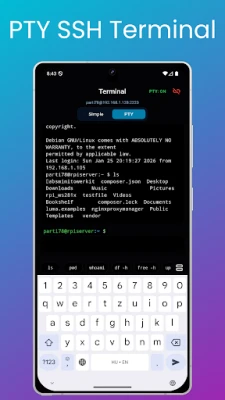
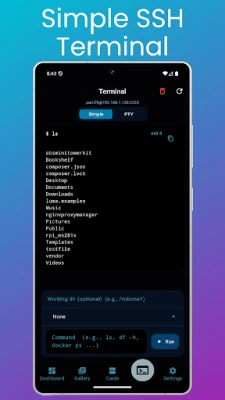
Terminal Modes
Choose the terminal experience that best fits your workflow:
• Simple terminal for basic commands and quick actions
• Full PTY terminal for interactive shell usage
The Ping screen is also directly accessible from the terminal view, allowing you to:
• quickly check network connectivity
• test latency and host availability
• perform targeted ping tests toward the selected server
Ideal for troubleshooting and network diagnostics directly within the SSH workflow.
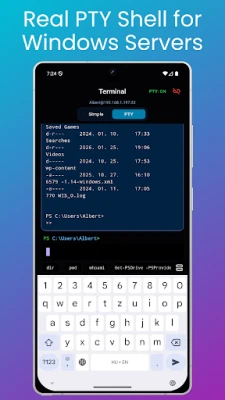
Windows PTY Support
• Full PTY SSH terminal for Windows servers
• Supports PowerShell and interactive commands
• Proper handling of interactive tools, prompts, and real shell behavior
• Ideal for Windows Server administration over SSH
⸻
Settings & Customization
The application is fully customizable:
• dark / light / colorful / system default themes
• language selection
• command card size adjustment (compact or large card layout)
• SSH and PTY terminal logging
• Ping feature settings and configuration
• configurable SSH timeout settings
• optimized for touch interaction and extended terminal usage
Tools section in Settings
• Ping – TCP/ICMP network test
• LAN Scan – Discover devices on your local network
• Port Scan – Scan common ports or custom ranges
⸻
Full Version
All features of the application are available with the Full version purchase.
The purchase is one-time only, no subscription required, and helps support further development.
It supports Raspberry Pi, Linux, Debian, Synology (Linux-based) systems, and Windows servers with OpenSSH, providing quick access to system status, maintenance tasks, and command execution.
⸻
System Overview (Dashboard)
View the most important system information at a glance:
• Uptime
• CPU usage
• Temperature
• Disks and total storage
• Mounted file systems
• Number of connected drives
Designed for fast diagnostics and everyday server monitoring.
⸻
Command Gallery (Samples)
A wide range of prebuilt command templates:
• can be quickly added to your own Command Cards
• perfect for maintenance, diagnostics, and administration tasks
• works across Linux-based systems and Windows PowerShell environments
⸻
Command Cards
Manage your custom commands using cards:
• add, edit, and search command cards
• drag & drop reordering
• Quick Run mode for one-tap execution
• global cards or server-specific cards
• reusable commands across multiple servers and platforms
⸻
Widget Quick Launch
Your most important command cards can be added as widgets:
• run commands without opening the app
• ideal for frequently used maintenance and monitoring tasks
• instant access to your most important server actions
⸻
Multi-server support
• add and edit multiple servers
• switch between servers quickly
• secure connections using SSH host key verification
• manage mixed environments (Linux + Windows) from one app
⸻
Terminal Modes
Choose the terminal experience that best fits your workflow:
• Simple terminal for basic commands and quick actions
• Full PTY terminal for interactive shell usage
The Ping screen is also directly accessible from the terminal view, allowing you to:
• quickly check network connectivity
• test latency and host availability
• perform targeted ping tests toward the selected server
Ideal for troubleshooting and network diagnostics directly within the SSH workflow.
Windows PTY Support
• Full PTY SSH terminal for Windows servers
• Supports PowerShell and interactive commands
• Proper handling of interactive tools, prompts, and real shell behavior
• Ideal for Windows Server administration over SSH
⸻
Settings & Customization
The application is fully customizable:
• dark / light / colorful / system default themes
• language selection
• command card size adjustment (compact or large card layout)
• SSH and PTY terminal logging
• Ping feature settings and configuration
• configurable SSH timeout settings
• optimized for touch interaction and extended terminal usage
Tools section in Settings
• Ping – TCP/ICMP network test
• LAN Scan – Discover devices on your local network
• Port Scan – Scan common ports or custom ranges
⸻
Full Version
All features of the application are available with the Full version purchase.
The purchase is one-time only, no subscription required, and helps support further development.
Rate the App
Add Comment & Review
User Reviews
Based on 0 reviews
No reviews added yet.
Comments will not be approved to be posted if they are SPAM, abusive, off-topic, use profanity, contain a personal attack, or promote hate of any kind.















More »

Popular Apps

KeyNavigatorKeyBank, N.A.

Quest Town SagaKairosoft

Knight Eternal: Pixel RPGJoshua Keith

KAIJU NO. 8 THE GAMEAkatsuki Games Inc.

Bank of America Private BankBank of America

Nitro Nation: Car Racing GameSupercharge Mobile

Grow Swordmasterpixelstar

MoboReels: Good Reel Short TVMOBOREADER TECHNOLOGY USA CO LTD

Wells Fargo Vantage℠Wells Fargo Mobile

IBKR MobileInteractive Brokers Group
More »
Editor's Choice

Grim Soul: Dark Survival RPGBrickworks Games Ltd

Craft of Survival - Gladiators101XP LIMITED

Last Shelter: SurvivalLong Tech Network Limited

Dawn of Zombies: Survival GameRoyal Ark

Merge Survival : WastelandStickyHands Inc.

AoD Vikings: Valhalla GameRoboBot Studio

Viking Clan: RagnarokKano Games

Vikings: War of ClansPlarium LLC

Asphalt 9: LegendsGameloft SE

Modern Tanks: War Tank GamesXDEVS LTD